
#042656
Hiraal Navy
Primary · structure
Hiraal Lifecare · Colour
Board 07 — “Two brand colours, a neutral scale, four states.” Navy carries structure; teal marks every action. Use the values as written.
The Group's two colours, unchanged. Navy is the frame; teal is what you can press.
Primary · structure
Accent · every action
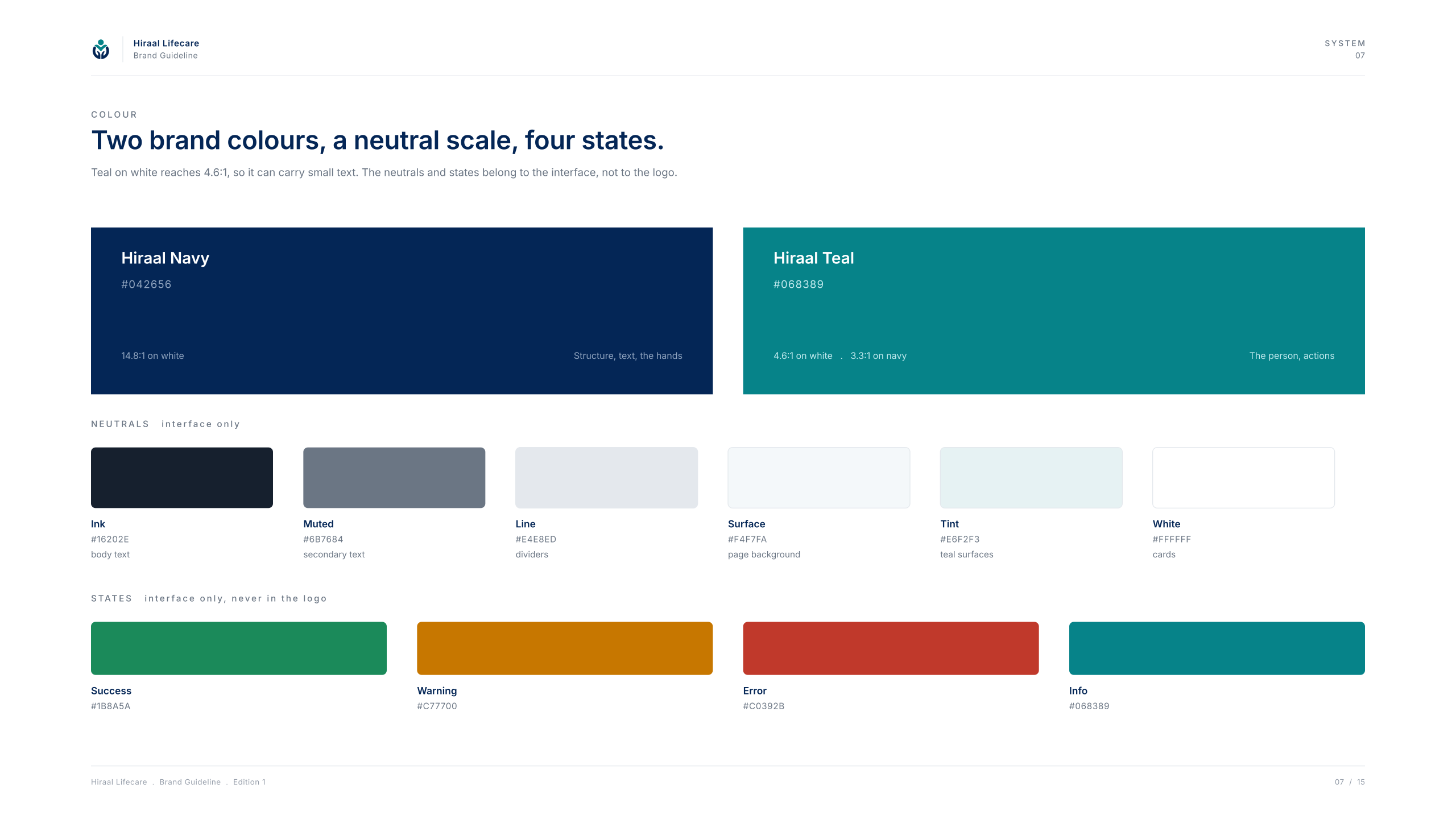
Text, dividers and surfaces. They never compete with navy and teal.
Success, warning, error and information are interface colours. Their values are printed on board 07 above; they belong to the app and are not part of the brand palette.
Contrast ratios for the pairings the interface actually uses. The last one is why teal never carries text on navy.
Navy on White
Headings, structure · 14.82:1
Passes AA for body text
White on Navy
Reversed text · 14.82:1
Passes AA for body text
Ink on Surface
Body on panels · 15.26:1
Passes AA for body text
Muted on White
Secondary text · 4.62:1
Passes AA for body text
White on Teal
Buttons, actions · 4.55:1
Passes AA for body text
Teal on White
Links, labels · 4.55:1
Passes AA for body text
Navy on Tint
Text on teal tint bands · 12.96:1
Passes AA for body text
Teal on Navy
Never for text · 3.26:1
Large text only (AA large)
Do
Don't